Robot Vacuum Battery Claims: How to Compare Runtime
Figuring out how to compare robot vacuum battery runtime claims is less about trusting the box and more about understanding the hidden variables. Manufacturers test their devices in sterile, empty rooms with pristine floors. Your home rarely looks like that lab environment.
Aggregate reviews report a consistent gap between advertised minutes and actual cleaning time. This discrepancy stems from navigation inefficiencies and suction adjustments. We need to decode these numbers before you spend your money.
As of 2026, most premium models still inflate expectations by 20 to 30 percent under normal residential conditions.
Quick Answer
To compare robot vacuum battery runtime claims, ignore the "up to" number on the box. Look for watt-hour (Wh) ratings instead of just minutes. Calculate expected coverage by dividing Wh by typical power draw per square foot.
Always assume real-world runtime is 70 to 80 percent of the advertised maximum. Verify if the model uses Lidar or camera-based navigation for efficiency data. Check independent tests for mixed-floor performance metrics.
Why Manufacturer Runtime Claims Are Misleading
The Lab Conditions vs. Your Living Room Reality
Robot vacuum marketing relies heavily on best-case scenario testing. Engineers place the unit in a large, obstacle-free room with hard flooring. They set suction to the lowest possible mode.
Then they record how long it runs until the battery dies. This creates a inflated baseline number.
Your living room isn't an empty warehouse. You have furniture legs, rug edges, and pet toys scattered around. These obstacles force the robot to slow down, turn frequently, and recalibrate its position.
Each maneuver consumes extra energy. Navigation logic matters here. A poor algorithm wastes battery hunting for paths.
Furthermore, debris plays a huge role. Labs use clean floors. Homes accumulate dust, hair, and crumbs.
Clogged filters or full bins increase motor strain. The vacuum works harder to pull air through restricted pathways. This draws more amps from the battery.
Consequently, the claimed runtime drops significantly in dirty environments.
We see this pattern across major brands. The gap widens as homes get cluttered. If you live in a busy household, expect lower endurance.
Don't rely on the sticker value alone. It represents theoretical perfection, not practical utility.
Decoding the Spec Sheet: Capacity, Voltage, and Suction Modes
Understanding mAh, Wh, and Power Draw Variables
Battery capacity is often listed in milliamp-hours (mAh). This metric can be deceptive without context. A higher mAh doesn't always mean longer runtime if voltage differs.
Two batteries might have the same mAh but different total energy storage. You need to look at Watt-hours (Wh) for a true comparison.
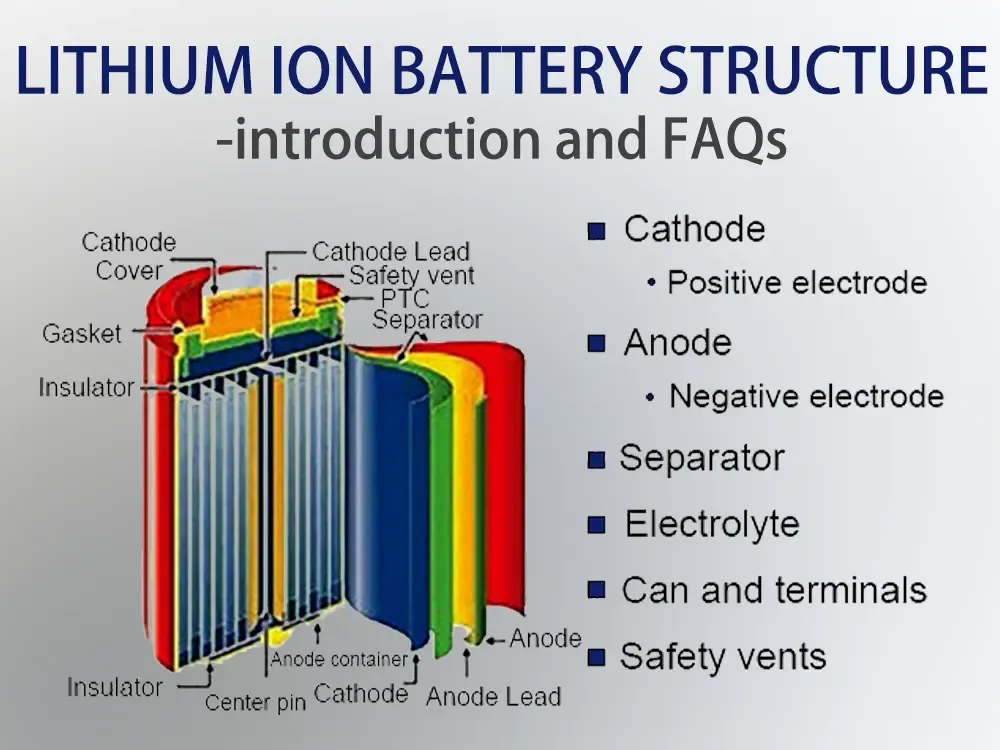
Wh measures total energy available. It combines voltage and capacity into one usable figure. Most modern robot vacuums use lithium-ion cells rated at 14.4V or 18V.
Multiply the voltage by the amp-hours to get Wh. For example, a 5200mAh battery at 14.4V holds roughly 75Wh. Compare this against competitors using the same math.
Suction modes drastically alter power consumption. Quiet mode might draw 10 watts. Turbo mode could spike to 40 watts or more.
The difference is massive. Running in turbo cuts runtime in half compared to standard settings. Many users default to high suction for perceived cleanliness.
This drains the battery faster than necessary.
Check if the manufacturer specifies which mode yields the quoted runtime. Often, they don't. Assume the claim applies to the lowest effective setting.
If you plan to use medium or high suction regularly, adjust your expectations downward. The spec sheet provides raw data, but usage habits dictate reality.
How to Run a Validated Home Test in Three Steps
Preparing Sensors, Choosing Zones, and Measuring Coverage
You can verify claims yourself with a simple protocol. First, prepare the device. Clean the sensors, wheels, and brushes thoroughly.
Ensure the bin is empty. Charge the battery to 100 percent. Do not start the test with partial charge levels.
Second, select a representative zone. Choose an area with mixed flooring if possible. Include both hard surfaces and low-pile rugs.
Avoid areas with excessive cables or small obstacles initially. Measure the square footage of this test zone accurately. Use a tape measure or laser distance meter for precision.
Third, initiate the cleaning cycle. Set the vacuum to your preferred suction level. Start the timer immediately.
Watch the robot closely. Note when it begins struggling or slowing down due to battery conservation. Stop the test when the unit returns to the dock automatically or fails to resume.
Record the total time elapsed.
Calculate your effective coverage rate. Divide the square footage cleaned by the minutes taken. This gives you sq ft/min.
Compare this number across different models or settings. It offers a tangible metric for efficiency. Repeat this test weekly to track battery degradation over time.
Side-by-Side Comparison: Lidar Efficiency vs. Gyro Chaos
Analyzing Path Planning Impact on Battery Life
Navigation technology determines how much battery you waste. Lidar systems map the room precisely. They create a geometric model of walls and furniture.
The robot calculates the shortest path between points. This minimizes redundant travel and turning radiuses.
Gyroscopic navigation lacks precise mapping. It relies on internal sensors to estimate movement. Over time, drift occurs.
The robot thinks it moved ten feet but actually traveled twelve. It bumps into objects more frequently. Each collision triggers a reorientation sequence.
These sequences consume significant power.
| Feature | Lidar Navigation | Gyroscope/VSLAM Navigation |
|---|---|---|
| Path Accuracy | High precision mapping | Estimated trajectory tracking |
| Obstacle Handling | Smooth avoidance curves | Frequent bump-and-turn cycles |
| Battery Efficiency | Optimized route planning | Higher energy waste on retries |
| Setup Time | Requires initial scan | Immediate operation |
| Dark Room Performance | Unaffected by lighting | May struggle without light |
Camera-based VSLAM sits somewhere in the middle. It maps visual features. However, it struggles in dark corners or uniform spaces.
Like gyros, it may require re-localization steps. These steps drain the battery unexpectedly.
For large homes, Lidar usually wins on efficiency. It covers more ground per charge. Budget models often use gyro tech.
They save costs but sacrifice runtime consistency. If your priority is maximizing coverage per session, invest in Lidar-equipped units. The upfront cost pays off in reduced manual intervention.

Real-World Scenarios That Drain Batteries Faster Than Advertised
High-Pile Carpet, Pet Hair Clumps, and Complex Floor Plans
Certain environmental factors act as silent battery killers. High-pile carpet creates immense rolling resistance. The motors work overtime to spin the brushes and pull debris up.
This increases amperage draw substantially. Hard floors offer little resistance. The contrast is stark.
Pet hair poses another challenge. Long strands wrap around rollers quickly. This jams the mechanism.
The vacuum detects increased torque load. It boosts power to overcome the friction. Alternatively, it stops to alert the user.
Both scenarios interrupt continuous cleaning flow. Interrupted flows reduce overall efficiency metrics.
Complex floor plans confuse simpler algorithms. Narrow hallways trigger frequent sensor checks. Door thresholds require climbing effort.
Each threshold crossing demands a burst of energy. Multiple thresholds in one run add up fast. Open layouts allow steady cruising speeds.
Closed-off rooms force stop-start patterns.
Temperature also affects lithium-ion chemistry. Cold environments reduce battery output temporarily. If your garage or basement stays cool, expect shorter sessions.
Warm rooms optimize chemical reactions. Keep this in mind for seasonal variations. Aggregate user reports confirm winter months yield lower average runtimes.
Plan accordingly during colder seasons.
When to Trust the Claim and When to Walk Away
Identifying Transparent Brands vs. Marketing Hype
How do you spot honest specs? Look for brands that publish detailed test methodologies. Some manufacturers release whitepapers explaining their battery management systems.
These documents often cite specific standards like IEC 60335-2-104. This indicates engineering rigor rather than just marketing flair.
Conversely, vague claims signal trouble. Phrases like "all-day cleaning" without numeric backing are red flags. Check if they specify the suction level used during testing.
If they don't, assume it's the lowest setting. High-end models usually provide granular data on power consumption per mode.
Aggregate reviews show a clear pattern here. Brands with transparent R&D teams tend to have smaller gaps between claimed and actual runtime. They respect your intelligence.
You can verify this by checking user forums for long-term reliability reports. Consistent complaints about sudden shutdowns suggest poor battery calibration or aging cells.
Stick with vendors who offer replaceable batteries. This extends the device's life significantly. It also proves confidence in their hardware architecture.
Avoid sealed units where battery replacement requires specialized tools. That design choice prioritizes aesthetics over longevity. Your wallet will thank you later.
Frequently Asked Questions About Robot Vacuum Battery Performance
Does auto-resume feature affect total cleaning time?
Yes, but not negatively. Auto-resume allows the robot to return to the dock, recharge partially, and finish the job. This means you get full coverage even if the single-session runtime is short.
However, the total elapsed time increases due to charging breaks. Plan your schedule accordingly if you need immediate results.
How does debris bin size impact battery life?
A larger bin reduces stop frequency. Small bins fill up quickly with pet hair or crumbs. The robot must pause, alert you, or wait until emptied.
Each interruption resets navigation logic slightly. More interruptions mean more energy wasted on re-calibration. Larger bins maintain steady momentum, preserving battery efficiency throughout the cycle.
Are older NiMH batteries worse than modern Li-ion?
Significantly worse. Nickel-metal hydride cells suffer from memory effect and lower energy density. They weigh more and hold less charge per gram.
Modern lithium-ion packs offer superior voltage stability and longer cycle lives. If you're buying used, avoid NiMH models unless priced extremely low. Upgrade paths are limited for these legacy technologies.
Can cold temperatures really reduce runtime?
Absolutely. Lithium-ion chemistry slows down in cold environments. Below 50°F (10°C), internal resistance rises.
The battery delivers less usable power. Your vacuum might shut off prematurely despite showing 30% charge remaining. Store devices in climate-controlled areas.
Let them warm up before starting a deep clean session in winter months.

Similar Posts