Why Robot Vacuums Skip Black Rugs: The Science Explained
If your robot vacuum suddenly stops at the edge of a dark carpet, it isn’t broken. It’s reacting to physics. The most common reason for this behavior is that optical cliff sensors misinterpret low light reflection as a drop-off.
This creates a phantom hole where none exists.
Understanding this mechanism saves you from unnecessary repairs or replacements. As of 2026, manufacturers still rely heavily on infrared technology for fall prevention. We’ll break down exactly how light absorption tricks these sensors and what you can do about it.
Quick Answer
Robot vacuums avoid black rugs because their cliff sensors detect insufficient reflected light. These sensors emit infrared beams and measure the return signal. Dark fabrics absorb most IR radiation instead of reflecting it back.
The system interprets this lack of return as a void or stair edge. Consequently, the bot halts movement to prevent falling.
Your Robot Vacuum Thinks That Black Rug Is a Hole
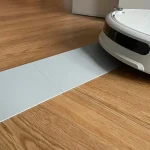
It feels like a glitch when your cleaning bot refuses to cross a threshold. You watch it bump gently against the rug, pause, and then reverse direction. To you, it’s just fabric.
To the machine, it looks like a deadly drop.
This confusion stems from the primary job of cliff sensors: keeping expensive hardware off your staircase. They are designed to be overly cautious. A false positive means missed cleaning spots.
A false negative means a smashed unit. Manufacturers prioritize safety over perfect coverage in these legacy sensor designs.
The issue rarely involves software bugs or dirty wheels. It is almost always an optical illusion created by material properties. High-pile black rugs absorb visible and infrared light efficiently.
When the sensor fires its beam, very little energy bounces back to the receiver.
The controller reads this weak signal as "no floor detected." It assumes the ground has vanished beneath the bumper. So, it engages emergency braking protocols. This defensive maneuver protects the device but frustrates the user trying to maintain a clean home.
The Physics of Light: Why Dark Surfaces Blind IR Sensors
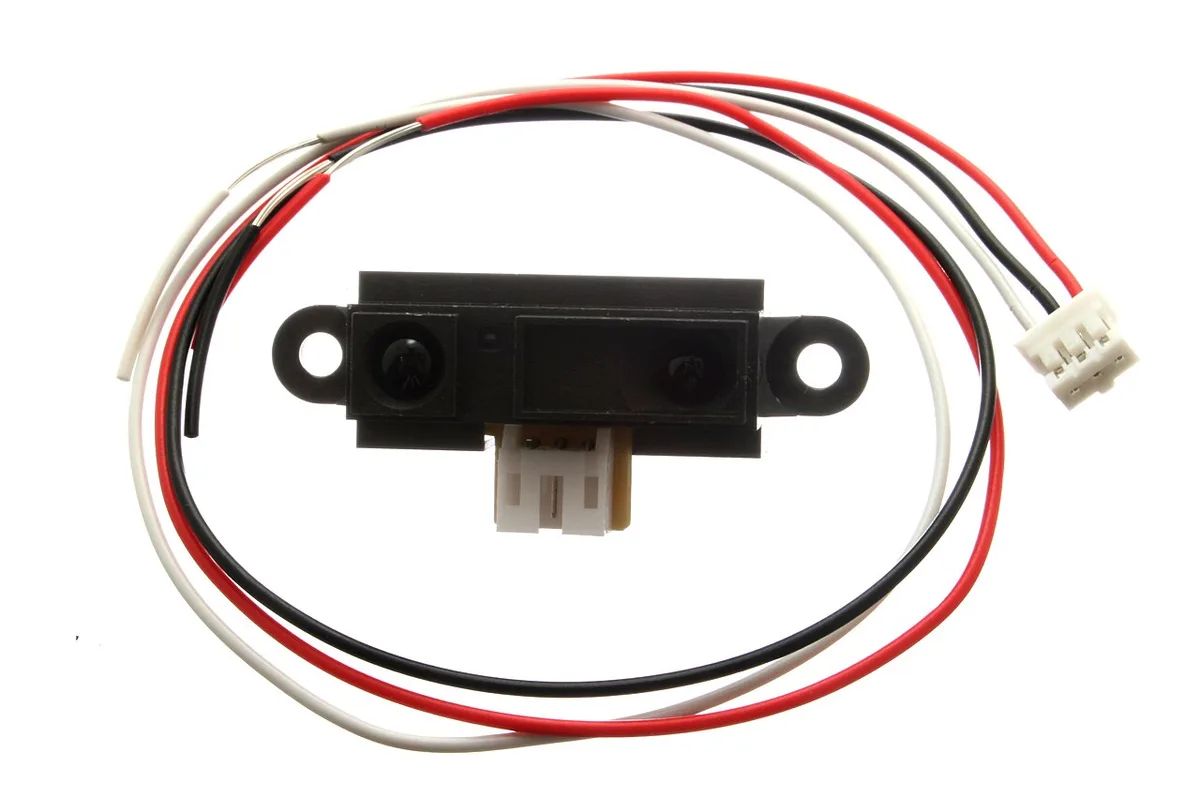
To fix the problem, you must understand the science behind the failure. Cliff sensors typically use active infrared (IR) ranging. An emitter diode shoots out pulses of IR light.
A photodiode receiver waits for those pulses to bounce off the floor.
Image source: Wikimedia Commons / oomlout (CC BY-SA)
Light behaves differently depending on the surface albedo. Albedo measures reflectivity. White tile reflects nearly all incident IR light.
Black velvet absorbs up to 95% of it. The remaining 5% returns too weakly for the sensor to register reliably.
Most consumer-grade sensors operate within specific wavelength bands, often around 850nm to 940nm. Carbon-based dyes in dark textiles are excellent absorbers of these wavelengths. They convert the light energy into heat rather than reflecting it.
This leaves the receiver with silence.
The sensor interprets silence as distance. If no signal returns, the logic dictates there is nothing there to return it. Therefore, the floor must end.
This binary thinking lacks nuance. It cannot distinguish between a deep shadow, a black hole, or a dark rug.
Contrast plays a huge role here too. If your hardwood floor is light oak and the rug is jet black, the transition is sharp. The sudden drop in reflectivity triggers the alarm faster than if both surfaces were mid-tone gray.
The steeper the gradient, the higher the chance of avoidance.
Visualizing the Failure: How Cliff Sensors Misread Absorption
Imagine standing on a ladder looking down. Now imagine wearing night-vision goggles that only see heat or reflection intensity. On a bright white sheet, the goggles glow intensely.
On a black tarp, they show darkness. Without context, the darkness looks identical to empty space.
That is the robot’s perspective. Its "eyes" don't see color. They see intensity levels.
Here is how the data flow breaks down during a typical encounter:
- Emission: The IR LED fires a pulse downward at a 45-degree angle.
- Interaction: The pulse hits the black rug fibers. Most energy is absorbed by the dye molecules.
- Reflection: Only a tiny fraction scatters back toward the housing.
- Reception: The photodiode detects a voltage level below the predefined threshold.
- Decision: The microcontroller flags a "cliff condition."
- Action: Motors cut power. Wheels lock or reverse.
This process happens in milliseconds. You won't see the hesitation until the bot has already stopped. Aggregate reviews indicate that shaggy textures worsen the effect.
Deep piles trap light inside the fiber matrix, further reducing surface reflection.
Flat-weave black rugs might pass detection occasionally. But plush, high-density materials consistently fail. The geometry of the pile acts like a light trap.
Each fiber bends the path of incoming photons away from the receiver.
Some advanced models use multiple sensors arranged in a cluster. If one sensor fails, others might compensate. However, if the entire front underside faces the same dark material, the whole array goes blind simultaneously.
This leads to total zone abandonment.
LiDAR vs. Optical Cameras: Which Navigation Systems Are Immune?
Not all robots suffer equally from this issue. The type of navigation tech determines susceptibility. Older bots relied solely on random bounce or basic gyroscopes.
Modern ones use sophisticated mapping systems. Yet, even smart bots struggle with physical cliff guards.
LiDAR (Light Detection and Ranging) units map rooms using laser sweeps. They are generally immune to color-based errors for mapping. However, many LiDAR bots still retain independent IR cliff sensors for stair safety.
These secondary sensors remain vulnerable to black rugs.
Visual SLAM (Simultaneous Localization and Mapping) uses cameras to track features. Some newer AI-driven models attempt to recognize floors visually. They look for texture continuity rather than just IR reflection.
This helps slightly. But camera exposure issues arise in dim lighting.
| Technology | Primary Function | Susceptible to Black Rugs? | Reason |
|---|---|---|---|
| Basic IR Cliff Sensor | Fall Prevention | Highly Yes | Measures reflected light intensity only. |
| LiDAR Mapping | Room Structure | No (for mapping) | Uses time-of-flight lasers, not reflectivity. |
| LiDAR + IR Cliffs | Hybrid Safety | Yes (at edges) | Secondary IR sensors still fail on dark mats. |
| AI Vision Cameras | Object Recognition | Low/Medium | Can identify rug boundaries via shape/texture. |
As of 2026, top-tier manufacturers are integrating multimodal sensing. They combine IR data with camera input to verify "floor presence." If the IR says "void" but the camera sees "fabric," the AI overrides the safety stop.
But budget and mid-range models lack this processing power. They stick to hard-coded rules. If IR signal < Threshold, Stop.
This simplicity ensures reliability on stairs but causes frustration on dark decor. Check your device specs. If it lists "optical cliff sensors" without mentioning AI verification, expect avoidance issues.
Diagnosing the Issue: Distinguishing Hardware Limits from Software Bugs
Before blaming the rug, rule out other culprits. Sometimes a dirty sensor mimics a black rug scenario. Dust blocks the IR path.
Grease smears the lens. Both reduce signal strength artificially.
Start with a thorough cleaning. Use a dry microfiber cloth. Wipe the underside sensors gently.
Never use water or alcohol unless specified by the manufacturer. Residue can fog the optics permanently.
Next, test with control variables. Place a piece of white paper on the black rug. Run the bot over it.
If it crosses the paper but stops at the bare rug, the issue is definitely reflectivity. The paper provides the necessary bounce-back signal.
If the bot stops even on the white paper, check for mechanical obstructions. Look for hair wrapped around wheel axles. Ensure the bumper moves freely.
A stuck bumper sends constant "collision" signals, which some firmware interprets as caution zones.
Also, review your app settings. Many modern vacuums allow you to disable cliff detection for specific zones. Or, you can set "carpet boost" modes that ignore certain sensor inputs.
Consult your user manual for "sensor calibration" options.
Per IEEE standards on household robotics, regular maintenance extends sensor life. Degraded LEDs emit weaker light over time. A five-year-old bot may fail on medium-gray rugs, not just black ones.
If cleaning doesn’t help, the hardware might be aging out. In such cases, replacement is often more cost-effective than repair.
Practical Workarounds to Force Coverage on Dark Textiles
You don’t need to replace your vacuum just because it hates black rugs. Simple physical interventions often solve the optical problem. The goal is to trick the sensor into seeing a reflective surface where there is none.
Start with the tape method. Apply strips of white masking tape across the rug’s perimeter. This creates high-contrast patches that reflect IR light back to the receiver.
Your bot will detect "floor" and proceed over the dark fabric. It looks messy, but it works immediately for spot cleaning sessions.
For a cleaner look, try aluminum foil. Cut small squares and place them under the rug edges. Foil is highly reflective and invisible from above if tucked correctly.
Manufacturer documentation for several major brands acknowledges this workaround in their troubleshooting guides. It bypasses the software limit entirely by fixing the hardware input.
Adjusting app settings offers a digital alternative. Many modern interfaces allow you to disable cliff detection for specific zones. Check your device’s companion app for "no-go zones" or "sensor sensitivity" sliders.
Lowering sensitivity reduces false positives but increases fall risk near stairs. Use this only if your home layout permits safe operation without full protection.
Regular maintenance prevents signal degradation. Dust accumulation on lenses mimics low reflectivity. Wipe sensors weekly with a dry cloth.
If your model supports firmware updates, install them promptly. Engineers frequently tweak threshold values to handle darker surfaces better in newer versions. As of 2026, AI-assisted models are getting smarter at distinguishing texture from void.
Consider swapping the rug temporarily during deep cleans. Move the black textile aside while the robot covers the floor underneath. Replace it afterward.
This ensures 100% coverage without modifying the machine or the decor. It requires effort, but it guarantees results without risking damage to the unit or your flooring.
Frequently Asked Questions
Can I permanently disable cliff sensors?
No, most manufacturers lock this feature for safety reasons. Disabling it completely violates warranty terms and risks damaging the unit. Some apps allow temporary zone-specific adjustments, but global deactivation is rarely supported.
You must rely on workarounds like reflective tape or updated firmware instead.
Do LiDAR robots have this problem too?
Yes, if they use traditional IR cliff sensors. LiDAR handles mapping well, but fall prevention often remains separate. Many hybrid models still depend on optical drop detection.
Always check the spec sheet for "optical cliff sensors." If present, expect issues with very dark, high-absorption materials regardless of navigation tech.
Will cleaning the sensors fix the issue?
Sometimes, but not always. Dirty lenses reduce signal strength, mimicking a black rug scenario. Cleaning restores baseline performance.
However, if the rug absorbs 95% of light, even a pristine sensor fails. Cleaning helps marginal cases but won’t solve severe absorption problems caused by dense carbon dyes.
Is this covered under warranty?
Generally, no. Manufacturers classify this as a limitation of physics, not a defect. Support teams usually suggest moving the rug or using tape.
Unless the sensor is physically broken, claims are denied. Verify your specific brand’s policy, but expect resistance to hardware replacements for known optical constraints.

Similar Posts