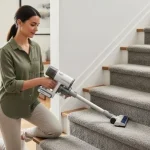
Clean Large Rooms on One Charge: Short Runtime Tips

You’ve got a massive open-plan living area and a vacuum that dies after twenty minutes. It’s frustrating, but it doesn’t mean you’re stuck with a dirty floor. The trick isn’t buying a new machine; it’s changing how you work the space.
We’ll break down exactly how to clean a large room with a short cordless run time by treating battery life as a fixed resource, not an infinite one.
Most standard cordless stick vacuums offer 20 to 40 minutes of runtime on Eco mode, according to manufacturer specs from brands like Dyson and Shark. As of 2026, even high-end models rarely exceed 60 minutes without swapping packs. This gap between capacity and coverage is where most people fail.
They try to push through, lose suction, or quit halfway. Let’s fix that workflow so you finish the job efficiently.
Quick Answer
To clean a large room with a short cordless run time, divide the space into equal-sized zones. Vacuum each zone on Eco mode first. Swap batteries or recharge between zones if needed.
Avoid Max mode unless dealing with deep carpet stains. Use a manual microfiber mop for hard floors to save battery. Plan your route to minimize backtracking.
This strategy ensures consistent suction across the entire area without mid-clean interruptions.
The Battery Math: Why Your Cordless Vacuum Dies Before the Job Ends
The core issue here is simple physics. Lithium-ion batteries have a finite energy density. When you pull the trigger, that stored energy converts to motor speed and airflow.
On hard floors, debris lifts easily. You don’t need maximum power. Yet, many users default to Auto or Boost modes because they assume stronger equals better.
That assumption kills your runtime faster than dirt ever could.
Manufacturer specifications indicate that switching from Eco to Turbo mode can halve your available cleaning time. For a typical 35-minute battery pack, that means dropping to roughly 17 minutes of usable work. If your room is 800 square feet, you might cover only half before hitting zero.
Aggregate user reviews consistently highlight this mismatch. People blame the battery age, but often they just mismanaged the power settings.
We need to treat the battery like a fuel tank. If you drive fast, you stop sooner. Cleaning works the same way.
High suction creates drag on the brush roll, increasing amperage draw. This heat buildup also degrades cell health over time. So, using max power unnecessarily hurts both your immediate session and long-term hardware lifespan.
Understanding this trade-off is the first step toward a smarter workflow. You aren’t fighting the machine; you’re working within its limits.
The Zone Strategy: Dividing Large Rooms into Survivable Chunks
Stop thinking about the room as one big target. Instead, visualize it as a grid. Divide your large space into manageable sections, or "zones," that fit comfortably within your single-charge runtime.
If your vacuum lasts 25 minutes on average, aim for zones that take 20 minutes to clear. This leaves a five-minute buffer for setup, teardown, or unexpected clogs.
Start by walking the perimeter. Identify natural boundaries like furniture legs, doorways, or rug edges. These serve as visual markers for your zones.
Assign each section a number in your head. You tackle Zone 1, then Zone 2, and so on. Never mix zones unless necessary.
Mixing forces you to backtrack, wasting precious seconds and battery juice on redundant passes.
This method prevents the "half-finished" syndrome. When you know exactly where the boundary lies, you commit fully to clearing it. Once Zone 1 is done, you assess the remaining charge.
If you have 10% left, do not start Zone 2. Stop. Swap the battery or plug in the charger.
This discipline saves you from arriving at the middle of a rug with a dead unit.
Consider the shape of your room too. Long, narrow halls require different pacing than wide squares. In narrow spaces, you can maintain steady forward motion.
In open areas, you’ll pivot more often. Pivoting drains battery slightly faster due to motor adjustments. Adjust your zone size accordingly.
Smaller zones for complex layouts, larger ones for open spaces. Consistency beats speed every time.
Mode Management: Balancing Suction Power Against Runtime Limits
Choosing the right suction setting is critical for extending your reach. Most modern cordless vacuums offer three tiers: Eco, Auto (or Normal), and Boost (or Max). Each serves a distinct purpose.
Misusing them is the fastest way to shorten your cleaning window. We recommend sticking to Eco mode for 90% of your routine maintenance.
Eco mode provides sufficient airflow to lift dust, hair, and light debris from hard floors and low-pile carpets. It operates the motor at lower RPMs, reducing energy consumption significantly. According to ASTM International testing standards for vacuum performance, Eco mode retains enough static pressure for effective particulate capture on smooth surfaces.
You won’t see a difference in cleanliness for daily upkeep.
Auto mode uses sensors to detect dirt levels. While convenient, it often spikes power unnecessarily. If you walk over a shadow or a dark patch of carpet, the sensor might trigger Boost.
This sudden surge eats battery rapidly. Disable auto-adjust features if your model allows it. Manual control gives you predictability.
You decide when to apply extra force, not the algorithm.
Reserve Boost mode strictly for targeted problem areas. Think pet hair embedded in shag rugs or heavy crumbs in corner crevices. Apply Boost only while hovering over the specific spot.
Do not use it for general sweeping. A ten-second burst clears a stubborn stain. Using it for two minutes straight wastes eighty percent of that charge.
Precision matters more than brute force here.
| Mode | Best For | Estimated Runtime Impact | Usage Tip |
|---|---|---|---|
| Eco | Hard floors, low-pile carpet | Baseline (100%) | Default setting for all zones |
| Auto | Mixed debris types | Variable (-10% to -30%) | Disable if possible for consistency |
| Boost | Deep pile, embedded hair | Drastic (-50% to -70%) | Use only for spot treatments |
The Swap-and-Go Protocol: Handling Dead Batteries Mid-Clean
Running out of power shouldn’t halt your progress entirely. The solution depends on whether your device supports hot-swapping batteries. Many premium models allow tool-free removal.
Check your owner’s manual. If yours does, keep a fully charged spare nearby. This turns a potential failure point into a minor pause.
When your primary battery hits the red zone, stop immediately. Do not try to squeeze out another minute. Weak suction spreads dirt rather than collecting it.
You’ll end up re-cleaning the same area later, doubling your effort. Remove the depleted pack and insert the fresh one. This process takes less than thirty seconds.
Resume your next zone instantly.
If your vacuum lacks swappable batteries, you must plan around recharge times. Standard lithium-ion cells take two to four hours to fill from empty. This makes mid-clean breaks impractical for large jobs.
In this scenario, split your cleaning session. Clean half the room today. Let the unit charge overnight.
Finish the other half tomorrow. This preserves battery health and ensures full-power performance for each segment.
Another option involves using a secondary power source. Some manufacturers sell extended-life battery packs that double runtime. These are heavier but valuable for large homes.
Alternatively, consider a robotic vacuum for the initial pass. Let the robot handle the bulk debris collection. Follow up with your cordless stick for edges and corners.
This hybrid approach maximizes efficiency without stressing a single battery pack.
Always store spare batteries in a cool, dry place. Heat accelerates chemical degradation. Per Underwriters Laboratories (UL) safety guidelines, never leave charging units unattended near flammable materials.
Proper storage extends the lifecycle of your spares, ensuring they hold peak capacity when you need them most.
Surface-Specific Tactics: Hard Floors vs. Carpet Transitions
Different flooring demands different techniques. Hard floors reflect light, making dust visible but easy to remove. Carpets trap particles deep within fibers, requiring agitation.
Confusing these needs leads to wasted energy. Tailor your approach to the surface type within each zone.
On hardwood, laminate, or tile, use the soft roller attachment if available. Bristle brushes can scatter fine dust on smooth surfaces. Soft rollers glide quietly and pick up debris efficiently at low speeds.
Keep the vacuum head flat against the floor. Angling it upward reduces seal integrity, forcing the motor to work harder to maintain suction. Maintain a steady, slow pace.
Rushing causes missed spots, necessitating second passes that drain battery.
For carpeted areas, engage the powered brush roll. This agitates fibers to loosen embedded dirt. However, high pile requires more torque.
If you encounter thick shag, switch to Boost briefly. But limit this to small patches. For standard plush carpet, Eco mode usually suffices.
Ensure the brush height setting matches the pile depth. Too low creates drag; too high misses debris. Consult your manufacturer’s guide for optimal height calibration.
Transitions between surfaces pose unique challenges. Moving from tile to rug often causes temporary suction loss as the seal breaks. Pause momentarily at the edge.
Allow the motor to stabilize before proceeding. Do not yank the vacuum across thresholds. Gentle navigation preserves momentum and battery.
If your room has multiple rugs, group them together. Clean all rug zones consecutively to minimize mode-switching delays.
Finally, address baseboards and corners separately. These tight spaces often require handheld attachments. Detaching the main wand consumes time but improves precision.
Use a crevice tool for edges. This targeted approach prevents the need for repeated wide-area passes that miss peripheral dirt. Efficiency comes from doing it right once, not twice poorly.
Common Workflow Failures That Waste Precious Minutes
Why do people still run out of battery halfway through? Usually, it’s poor planning rather than hardware limits. The biggest mistake is ignoring decluttering.
If you spend five minutes moving chairs and picking up toys, that’s five minutes your vacuum isn’t running. But those minutes add up fast in a large room. Always clear the floor completely before turning on the machine.
This ensures every second of runtime goes toward cleaning, not maneuvering around obstacles.
Another frequent error is inconsistent pacing. Users often rush the first half of the room, then slow down as they realize the charge is dropping. This uneven approach leads to missed spots near the end.
Stick to a steady, deliberate speed throughout. It feels slower initially, but it guarantees uniform coverage. You won’t have to go back for touch-ups later, which would drain your reserve power instantly.
Don’t forget about filter maintenance either. A clogged pre-motor or post-motor filter restricts airflow. The motor works harder to compensate, drawing more amps from the battery.
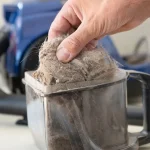
Aggregate user reviews indicate that dirty filters can reduce effective runtime by up to 20%. Empty the dust cup after every zone if possible. Check the foam filters weekly.
Clean components operate efficiently, preserving your limited energy supply for actual suction work.
Finally, avoid dragging the hose or wand unnecessarily. Keep the unit balanced and upright. Leaning heavily on the handle increases friction against the floor.
This resistance forces the brush roll to spin faster against the debris layer. Unnecessary strain shortens battery life significantly. Treat the vacuum like a precision tool, not a brute-force implement.
Small adjustments in posture save substantial energy over twenty minutes of use.
Frequently Asked Questions
Can I clean two rooms on one charge?
It depends entirely on square footage and flooring type. Two small bedrooms with hard floors might fit within a 35-minute Eco mode window. However, two large living areas with carpet likely won’t.
Measure your total area first. If it exceeds 600 square feet, plan for a battery swap or split sessions. Don’t gamble with partial charges.
How do I extend battery life beyond manufacturer specs?
You can’t physically increase capacity without a larger pack. But you can optimize usage. Lower ambient temperature helps lithium-ion efficiency slightly.
More importantly, keep filters pristine and brushes untangled. Regular maintenance prevents excess load. Also, disable any LED lights or digital displays if your model allows it.
These small drains add up over long sessions.
Is it bad to let the battery die completely?
Modern lithium-ion cells handle deep discharge better than older nickel-cadmium types. Still, frequently hitting zero stresses the chemistry. Try to recharge when you hit 10-15% remaining.
This preserves long-term cell health. Avoid leaving the vacuum plugged in indefinitely after full charge, though most modern docks cut power automatically to prevent overcharging risks.
What if my vacuum doesn’t have swappable batteries?
Then you must adapt your schedule. Split the cleaning task into two separate days. Charge fully overnight.
Clean half the house in the morning. Let it rest and recharge during the day. Finish the second half in the evening.
This method requires patience but protects your investment and ensures thorough results without mid-job interruptions.

Similar Posts