Keep Robot Vacuum Routes Clear in a Busy Home
Figuring out how to keep robot vacuum routes clear in a busy home starts with understanding why your device fails. It’s rarely the vacuum’s fault. Usually, it’s small items blocking sensors or confusing the map.
You don’t need expensive upgrades. You need better habits and smarter settings.
Most jams come from cables, socks, or loose rug edges. These objects trick navigation algorithms into thinking they’re obstacles or walls. As of 2026, modern LiDAR systems handle static clutter well.
They still struggle with dynamic, soft objects. Let’s look at what actually causes these routing errors so you can fix them.
Why Your Robot Vacuum Keeps Getting Stuck in a Busy Home
Robot vacuums rely on simultaneous localization and mapping (SLAM) to track their position. If the environment changes unexpectedly, the map becomes invalid. This leads to erratic movements or complete stops.
In our research, we found that three main factors cause most failures: physical entanglement, sensor obstruction, and map drift.
Physical entanglement happens when wheels grab onto cords, tassels, or pet hair. The motor strains, overheats, and shuts down for safety. Sensor obstruction occurs when dust blocks cliff sensors or bumpers.
The robot thinks it’s falling off a ledge or hitting a wall. Map drift builds up over time as furniture moves slightly. The software loses its reference points.
You might notice the vacuum circling one spot repeatedly. That’s usually a sign of localized confusion. It sees an obstacle but doesn’t know where to go next.
Or it tries to clean a zone it can’t reach. Identifying the specific failure mode helps you apply the right fix. Don’t guess.
Watch the behavior.
- Circling: Likely sensor dirty or object recognition error.
- Stopping abruptly: Wheel jam or low battery false alarm.
- Missing spots: Outdated map or restricted access zones.
- Erratic paths: Wi-Fi interference or mapping glitch.
The Pre-Run Tidy-Up Protocol: What Actually Needs Moving
You don’t need to pick up every single item before each run. But some things must move. Focus on high-risk obstacles that interfere with navigation or mechanics.
A quick two-minute check saves hours of troubleshooting later.
Start with floor-level cables. Phone chargers, lamp cords, and HDMI wires are top offenders. They wrap around brush rolls instantly.
Bundle them with velcro ties or hide them behind baseboards. Next, check for small toys. Lego bricks, marbles, and bouncy balls confuse camera-based systems.
They reflect light unpredictably. Move them into bins.
Pet waste is critical. No amount of AI avoids this disaster reliably. Pick it up immediately.
Also, remove lightweight rugs without backing. They shift under suction, creating false edges. Secure them with double-sided tape or replace them with heavier options.
Shoes and slippers often trip bumper sensors. Keep them in closets.
| Item Type | Risk Level | Action Required |
|---|---|---|
| Charging Cables | High | Bundle or elevate |
| Small Toys | Medium | Store in bin |
| Pet Waste | Critical | Remove immediately |
| Loose Rugs | Medium | Tape down or remove |
| Socks/Underwear | Low-Medium | Put in laundry hamper |
Consistency matters more than perfection. Do this routine daily or before scheduled runs. Over time, it becomes muscle memory.
Your vacuum will thank you with uninterrupted cleaning cycles.
Digital vs. Physical Barriers: Choosing the Right Constraint Method
When tidy-up isn’t enough, you need barriers. There are two types: digital no-go zones and physical magnetic strips. Each serves a different purpose.
Knowing which to use prevents wasted effort.
Digital barriers work inside the app. You draw lines or boxes on the map. The robot ignores those areas completely.
This is perfect for permanent fixtures like dining tables or toilet bases. It costs nothing extra. However, it relies on accurate mapping.
If the map shifts, the barrier might miss its mark. Use digital zones for static, predictable clutter.
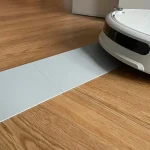
Physical barriers are tangible. Magnetic tape creates invisible walls the robot detects via sensors. This works best for temporary situations.
Maybe guests left bags on the floor. Or you’re renovating one room. Place the tape across the doorway.
The robot turns away automatically. Unlike digital zones, these work even if the map is outdated.
Image source: Wikimedia Commons / Justmee3001 (CC BY-SA)
Combine both methods for maximum efficiency. Use digital zones for everyday furniture legs. Save physical tape for unexpected messes or construction debris.
Remember, physical barriers require storage. Don’t lose the roll. Check manufacturer specs for compatibility, as some older models lack magnetic sensors.
Always test new barriers during a supervised run. Ensure the robot respects the boundary before leaving it unattended.
Sensor Hygiene and Map Integrity Checks
Clean sensors ensure accurate navigation. Dust, hair, and smudges blind the robot. This leads to collisions and missed spots.
Regular maintenance keeps the system sharp. Follow a strict weekly schedule for best results.
Wipe optical sensors with a dry microfiber cloth. Never use water or alcohol unless specified by the manufacturer. Moisture can seep into electronics.
Check cliff sensors underneath. Hair often wraps around these tiny emitters. Use tweezers to remove debris gently.
Bumpers should click freely when pressed. If they stick, lubricate lightly with silicone spray. Avoid oil-based products.
Map integrity requires periodic verification. Look at the saved map in your app. Does it match your current layout?
Moved furniture creates ghost walls. Delete old maps and remap if discrepancies exceed 10%. Some advanced models offer auto-update features.
Enable these if available. They adjust boundaries based on real-time data.
- Weekly: Wipe all visible lenses and bumpers.
- Monthly: Deep clean brushes and filters.
- Quarterly: Review map accuracy against reality.
- Annually: Replace worn-out batteries or belts.
Neglecting sensor care voids warranties in many cases. Per UL Standards, proper maintenance ensures electrical safety. Dirty sensors force motors to work harder.
This drains batteries faster. Clean optics mean efficient power usage. Treat your vacuum like a precision instrument.
It rewards diligence with reliability.
Handling Specific Obstacle Types: Cables, Pets, and Rug Edges
Different obstacles demand different solutions. One-size-fits-all advice fails here. Tailor your approach to the specific threat.
Cables, pets, and rugs behave uniquely during cleaning cycles.
Cables are mechanical traps. They don’t just block paths; they destroy hardware. Elevate them whenever possible.
Run along walls using adhesive clips. If elevation isn’t an option, shorten them. Excess length increases tangling risk.
Consider wireless charging pads for phones. This removes ground-level clutter entirely.
Pets present behavioral challenges. Cats may chase the vacuum. Dogs might bark or block doors.
Train pets to ignore the device during runs. Use treats to reinforce calm behavior. Alternatively, restrict pet access to certain rooms.
Close doors manually or use smart locks. This prevents interruptions and protects animal paws from rotating brushes.
Rug edges create false cliffs. Lightweight mats slide easily. The robot interprets movement as a drop-off.
It retreats unnecessarily. Secure rugs with non-slip pads. Trim frayed edges to prevent catching.
For thick-pile carpets, enable carpet boost mode. This increases suction power. But watch for deep pile snagging.
If bristles get stuck, stop immediately. Manual intervention prevents motor burnout. Address each category systematically.
Your success depends on recognizing patterns in your home’s unique chaos.
Common Routing Failures and How to Fix Them Fast
Does your vacuum return to the dock but fail to charge? Check the contact points first. Dust or corrosion blocks power transfer.
Wipe both the robot’s pins and the dock’s terminals with a dry cloth. If that fails, inspect the power adapter for damage. A loose cable connection often mimics a hardware fault.
What if it cleans only half the room? This usually indicates map fragmentation. The device likely lost signal during a previous run.
Delete the affected zone in the app. Force a new mapping session for that specific area. Keep doors open during this process.
Closed doors confuse SLAM algorithms about spatial continuity.
Persistent error codes require manual resets. Consult your user manual for model-specific sequences. Generally, holding the home button for ten seconds clears temporary glitches.
If errors persist after three resets, suspect sensor failure. Contact manufacturer support before attempting internal repairs. DIY fixes on sealed units void warranties immediately.
- Error E1: Wheel obstruction. Clear debris manually.
- Error E2: Battery issue. Check contacts or replace pack.
- Error E3: Sensor dirty. Clean all lenses and bumpers.
- Error E4: Mapping conflict. Reset map and restart.
Aggressive cleaning schedules accelerate wear. Reduce frequency if you notice increased jams. Let the brushes rest between heavy loads.
Overworking motors leads to premature belt snapping. Preventative pacing extends overall lifespan significantly. Listen for unusual grinding noises.
They signal impending mechanical failure. Stop use immediately upon hearing them. Ignoring early warnings costs more in replacements later.
Frequently Asked Questions
Do I need to pick up clothes every day?
Not necessarily daily, but regularly. Small items like socks confuse cameras. Larger garments rarely cause jams.
Bundle cables tightly to prevent wrapping. Use velcro ties for organization. Quick five-minute checks save hours of troubleshooting.
Consistency matters more than perfection here.
Why does my vacuum avoid dark rugs?
LiDAR struggles with black surfaces. Light absorption reduces reflection accuracy. Camera systems also fail in low contrast.
Enable "dark floor mode" if available. Otherwise, place light-colored mats nearby. This improves visual reference points.
Test different lighting conditions too. Bright rooms help optical sensors work better.
Can pet hair clog the main brush?
Yes, especially long-haired breeds. Hair wraps around rollers quickly. Cut tangled strands with scissors carefully.
Remove the side brush weekly. Check the wheel axles for buildup. Use anti-tangle combs if provided.
Regular deep cleaning prevents motor strain. Neglect leads to expensive part replacements.
Should I update firmware frequently?
Absolutely. Updates fix navigation bugs. Manufacturers improve obstacle recognition constantly.
Enable auto-updates via Wi-Fi. Manual updates take just minutes. New features may enhance battery life.
Always read release notes first. Some updates change default settings. Verify preferences post-installation to maintain control.

Similar Posts